A personal page for makeup artists
Brides and brands find makeup artists on Instagram, then go looking for the answers Instagram doesn't give: price, travel, availability on their date and whether your work holds up in daylight, not just under a ring light.
What your page should include
- Your best looks, grouped by type: bridal, editorial, party
- Packages with starting prices and what's included
- Where you work and your travel fee
- Reviews from brides or clients with the event and month
- An enquiry form that asks for the date, venue and number of people
Sections that work
Portfolio → Bridal packages → Kind words → Where I travel → Check my date
Looks to start from
Gallery White or Aurora Glass: soft, polished, photo-first. Ivo can restyle any of them to your colours.
Instagram shows the work, your link closes the booking
Brides, stylists and brands find makeup artists through Instagram, wedding planners and photographers. Then they open your bio link to answer questions your grid can't: what does it cost, do you travel to my venue, are you free on 14 February, and does the makeup look this good outside the ring light?
A page that answers those in one scroll turns DMs that say "price?" into enquiries with a date, a venue and a budget.
Show your range, then your speciality
Group your work so each visitor finds their kind of look: bridal, engagement and sangeet, editorial and shoots, party, and hair if you do it. Within bridal, show a range of skin tones and both day and evening light; brides look for someone who has done skin like theirs. Ten great images per category beat a hundred.
Use photos from photographers who credit you, and credit them back. Get the client's consent before posting close-ups, and keep the ones they asked you to remove off the page.
Packages that pre-answer the questions
List packages with starting prices and exactly what's included: trial, lashes, draping, touch-ups, number of looks, early-morning start. Then list what's extra: travel outside the city, additional family members, assistants. Brides compare three or four artists; the one with clear packages feels like the safest choice.
If you take a deposit to confirm a date, explain how. Many artists link an offer to their own payment page or UPI request; featurd shows the link, and the money goes straight to you.
Your featurd setup
- Header: name, speciality and city: "Bridal and HD makeup, Jaipur and destination weddings".
- Gallery: bridal, then party and editorial, using the gallery's grid or carousel layout.
- Offers: packages with starting prices and what's included.
- Testimonials with event and month; ask brides for a Trust proof so the review is confirmed.
- Map widget for your studio, if clients come to you.
- Contact: enquiry form with custom questions for the event date, venue, number of people and preferred look.
- Book: trial sessions and studio appointments, synced with Google Calendar.
- Products: a makeup class or a free skin-prep guide; paid classes on Pro through your own Stripe or Razorpay with 0% to featurd.
- Instagram widget lower down, free on every plan, for people who want more.
An example page
Simran Kaur is a bridal artist in Jaipur. Her page uses Gallery White: framed photos with small wall labels like "Day bride, airbrush, Rambagh Palace". After eight bridal images comes a "Packages" section: Bridal HD from ₹35,000, Airbrush from ₹45,000, Family member ₹6,000, travel quoted by venue. Three bride reviews follow, then an enquiry form asking the date, venue and number of people, and a booking section for ₹2,500 trials.
During peak season, she adds a line at the top: "Booked 9 to 18 December; a few dates left in January". It saves her forty DMs a week.
Peak season without the chaos
Wedding season compresses a year's bookings into a few months. Use an enquiry form with the questions you always ask, like date, venue, ceremony time and number of people, so each lead arrives complete. Leads land in one list in featurd, so nothing gets lost between DMs, WhatsApp and email, and you can see who you still owe a reply.
When a date is gone, say so on the page. A short "Booked dates" line saves you replying to the same question forty times.
Small details that land bookings
- Show prices. "DM for price" loses brides who are comparing three artists tonight.
- Reply fast. featurd sends a notification for each enquiry; on Pro, chat lets brides ask a quick question on your page, and Ivo can draft the reply about travel fees while you're on a shoot.
- Send your page to planners with a tracked link and follow up when they open it.
- Keep the hero photo light. Gallery White and Aurora Glass load fast and let skin tones show true.
Keep the page as fresh as your feed
Swap two or three gallery images each month for your latest work, so returning planners always see something new.
Getting started
Paste your current link page or Instagram bio, and Ivo drafts packages and sections. Then pick a look in Explore. Shooting as well as styling? See our page for photographers.
Looks to start from
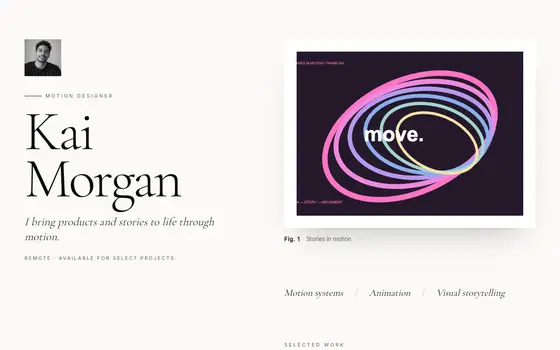 Gallery White
A museum wall: monumental serif, framed work with wall labels, slow unveiling reveals.
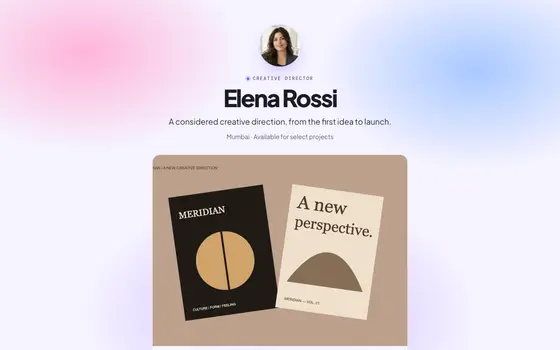 Aurora Glass
Soft gradients and frosted glass.
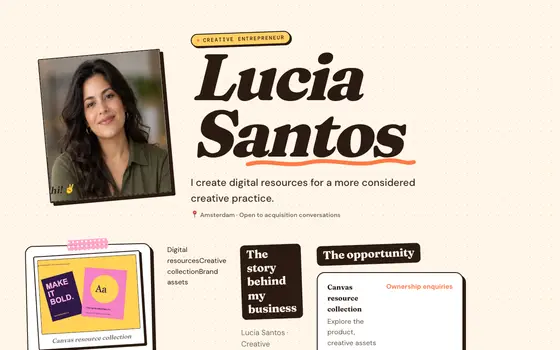 Paper Cut
A creator's scrapbook: taped polaroid, sticker buttons, pinned cards.
See all 36 templates, live pages in Explore, or describe your own and Ivo builds it.
Questions
What should a makeup artist put in their link in bio?
Your best work by category, packages with starting prices, travel area, reviews with the event and month, and an enquiry form that asks for the date and venue.
Should makeup artists show prices?
A starting price per package filters out budgets you can't work with and makes serious brides more confident to enquire. Note what's extra: trials, early starts, travel.
Can I sell a makeup course or masterclass?
Yes. List it as a product: free ones on every plan, paid ones on Pro through your own Stripe or Razorpay with 0% to featurd. For live classes, a booking type with limited slots works well.