A personal page for musicians
A musician's link serves fans who want the new single, bookers who want a press kit, and other artists who want to hire you for a session. One page can do all three if you put them in the right order.
What your page should include
- Your latest release, playable right on the page
- Upcoming shows with dates and ticket links
- A short bio and two or three press quotes
- Booking contact with the questions promoters always ask
- A mailing list sign-up for release news
Sections that work
New release → Shows → Watch → Press & bio → Booking
Looks to start from
Spotlight or Neon Tokyo: stage lights and big type. Ivo can restyle any of them to your colours.
Three audiences, one link
A musician's bio link gets tapped by fans who want the new track, by promoters and venue bookers deciding whether to put you on a bill, and by other artists or brands looking to hire you for a session, a jingle or a wedding. Most link pages serve only fans, which is why bookers end up digging through your Instagram for a contact email.
Order the page by what matters this month. Release week, the single goes first. Tour month, the dates go first. The rest follows in a stable order so returning visitors know where things are.
Let people listen without leaving
Every tap that sends a fan to another app is a chance to lose them. On featurd, Spotify and YouTube players sit right on the page, free on every plan, and load only when tapped so the page stays fast on a phone at a gig. Put your latest release first, one live video second, and your back catalogue lower down.
Only embed music you have the rights to share. Covers and remixes may need permission; a label or distributor contract may say where you can post full tracks.
Give bookers a real press kit
Promoters want an electronic press kit they can skim in a minute. Build it into the page:
- Short bio (50 words) and long bio (200 words), so they can paste whichever fits their listing.
- Three press photos in landscape and portrait, which they can download.
- Two or three tracks or videos that represent your live sound, not just the studio cut.
- Notable shows, festivals and press quotes, named.
- Technical needs: line-up, backline, set length.
- A booking form that asks for the date, city, venue and fee range.
Your featurd setup
- Header: artist name and a one-line description of your sound.
- Spotify: the current single or EP.
- Cards or links: upcoming shows with date, city and ticket link.
- YouTube: one live performance.
- Text and gallery: bio and press photos.
- Subscribe: release news by email, on every plan. You own that list, unlike your followers.
- Products: stems, sample packs, sheet music or a free download for email. Paid products are on Pro through your own Stripe or Razorpay with 0% to featurd.
- Contact: the booking form with up to five extra questions.
An example page
Kavya and the Monsoon Static, an indie band from Mumbai, use the Spotlight look: gold light sweeping across a black stage. Their new single plays at the top. Under it, "On tour" lists eight dates with ticket links, then a live session on YouTube, then a subscribe box: "First to hear new music, no spam".
Halfway down, a section titled "For promoters" has both bios, downloadable photos, a stage plot and a form asking for venue capacity and budget. When they pitch a festival, they send a tracked link and see when the booker opened it.
Session work and private gigs
Many musicians earn more from session work, teaching, weddings and corporate events than from streams. Those buyers want something different from fans: a repertoire list, a short video of you playing in a similar setting, a starting fee and a form that asks the date, venue and set length. Put this on a sub-page called "Hire me" so it doesn't clutter the fan page, and link to it from the booking section.
If you teach, a booking type for lessons synced with Google Calendar saves a week of messages every term.
Small details that sell tickets
- Remove past shows the morning after. A stale tour list says the band stopped.
- Use a goal bar for a crowdfunded record or a ticket target, if the number is real.
- Keep social icons at the bottom. Fans already follow you; the page is for the next step.
- On Pro, put the page on your own domain, like yourband.com, and use up to five pages for side projects.
Know which link sold the tickets
Use a tracked link or UTM tag for each place you share the page, like the Instagram bio, a poster QR code and the newsletter, and insights show which one actually sends people to ticket links.
Getting started
Paste your current Linktree or EPK, and Ivo drafts the page, keeping your links. Then pick a look in Explore: Spotlight for drama, Neon Tokyo for electronic acts, Riso Print for the zine-and-cassette crowd. If you also create content full-time, see our page for creators.
Looks to start from
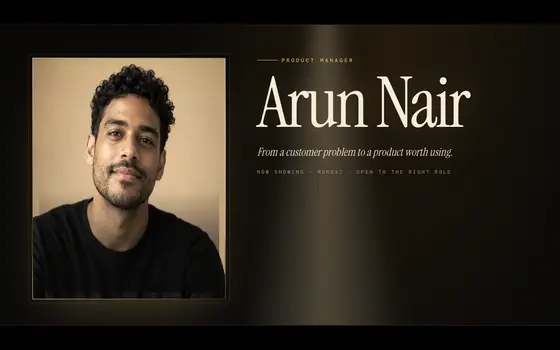 Spotlight
A film premiere: gold-framed portrait, sweeping light, sections as acts.
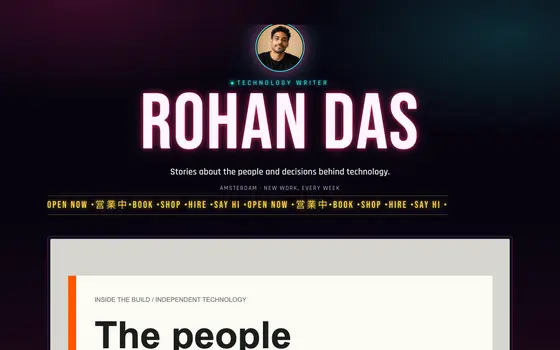 Neon Tokyo
Midnight street signage: flickering neon name, a scrolling ticker, glowing magenta and cyan tubes.
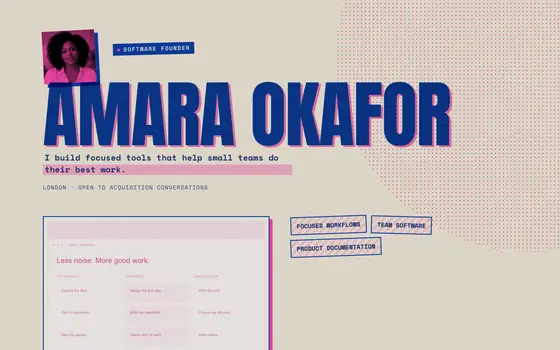 Riso Print
Two-drum risograph zine: pink and blue ink slightly off-register, halftones and paper grain.
See all 36 templates, live pages in Explore, or describe your own and Ivo builds it.
Questions
Can I embed Spotify and YouTube on my page?
Yes. Spotify and YouTube players are free on every plan and load only when tapped, so the page stays fast.
What should an electronic press kit (EPK) include?
A short and a long bio, press photos you're happy for people to download, two or three tracks or videos, notable shows or press quotes, technical needs and a booking contact.
Can I sell merch or sample packs?
Digital goods like sample packs, stems and sheet music can be listed as products: free ones on every plan, paid ones on Pro through your own Stripe or Razorpay with 0% to featurd. For physical merch, link to your existing store.